
Xtream Codes

Xtream Codes player for Apple TV, iPhone, iPad and Mac

Your provider gave you a server address, a username and a password. Neverlag turns them into a channel list with guide, movies and series — on all four Apple devices, with one subscription.

Apple TV · iPhone · iPad · Mac · Fire TV · Android soon

Now on the App Store for Apple TV, iPhone and iPad. The Mac app follows shortly under the same link. One purchase for all Apple devices (Universal Purchase).

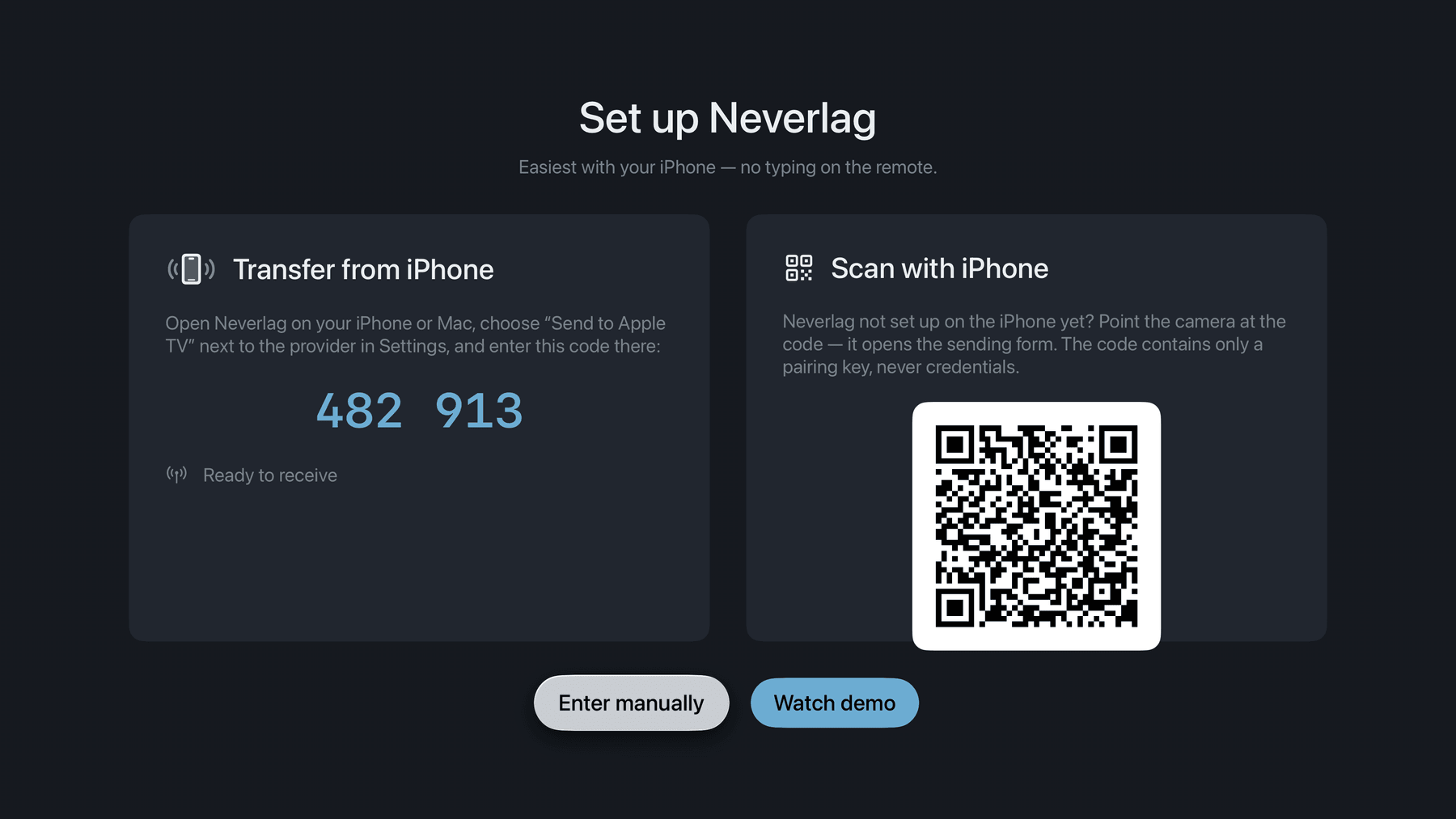
Neverlag on Apple TV: the six-digit code for sending the credentials from the iPhone

Xtream Codes is the most common way IPTV providers hand out access: not a playlist file but three fields — server, username, password. A player that speaks Xtream fetches the channel list, the groups, the programme guide and the movies and series from the provider by itself, and notices when the subscription expires.

Neverlag is a player. It contains no channels and names no providers; the credentials come from you.

What an Xtream Codes player does in Neverlag

  1. Three fields, one catalogue

    Settings → Providers → “Add Xtream account”: server address (with http or https and the port, as your provider wrote it), username, password. Neverlag signs in, loads the catalogue and sorts the channels into the provider’s groups. The guide comes with it; if the provider has none, an XMLTV link fills the gap.

    The password is stored in the device keychain only. There is no account at Neverlag, and nothing is sent to us.

  2. On the Apple TV without typing

    The Apple TV shows a six-digit code and a QR code. On the iPhone, iPad or Mac, “Send to Apple TV” transfers the Xtream credentials encrypted over your home network — no typing with the remote.

  3. Movies and series

    If your provider offers video on demand, Neverlag shows movies and series in their own section, with details loaded on request (“Load movie details”), filters by year and genre, and remembers where you stopped.

  4. The connection limit

    Most Xtream subscriptions allow one connection. When a second device starts, many players throw the first one out and both reload in turns. Neverlag waits instead, shows you the numbers on screen and tries again by itself. A recording and the live picture share one connection.

    Measured: with 2 providers the first connection was ended 3.2 to 8.4 seconds after the second started; a 44-minute recording over the running playback connection produced 0 limit errors.

  5. Expiry, refresh, several providers

    The expiry date of your provider access is shown under Diagnostics → “Provider overview”, and Neverlag tells you when it has expired. The catalogue refreshes on its own or on demand (“Refresh catalogue now”). Several providers side by side are fine; if a channel is down at one, Neverlag can play the same channel from another list.

  6. When the provider falters

    Xtream streams come as one continuous stream or as small pieces. Either way Neverlag keeps a reserve of 20 to 30 seconds and fetches a new connection in the background when the old one breaks — the picture keeps running, nothing starts over.

    Measured: connection cut for 20 seconds — no freeze. Cut for 60 seconds — the picture stood for 40.3 seconds, and the stream did not start over.

Xtream Codes or M3U?

Both work in Neverlag. If your provider offers both, Xtream is the more complete one.

Xtream CodesM3U playlist
What you get server, username, passworda link or a file
Channel list from the provider, with groupsfrom the file
Programme guide from the providerXMLTV link, if the provider has one
Movies and series yes, if the provider offers themonly if they are in the list
Expiry date shown in the appnot available
Refresh automaticautomatic, if it is a link

Neverlag is an IPTV player for Apple TV, iPhone, iPad, Mac and Fire TV for Xtream Codes and M3U providers. It separates fetching the stream from playing it, so that connection drops do not lead to reloads. Measured: 60 seconds without a connection, zero reloads.

Measured: Neverlag, in the Playback Lab, on our own devices. Other players: not yet measured. We name no providers and recommend none — you bring your own list or credentials.

Questions about Xtream Codes

What is an Xtream Codes player?

An app that signs in to an IPTV provider with server address, username and password and fetches the channel list, groups, programme guide and video on demand from there. Neverlag is one — for Apple TV, iPhone, iPad and Mac.

My provider only gave me a long link. Is that Xtream?

Often yes: a link with “get.php?username=…&password=…” is an M3U link generated from Xtream credentials. You can add it as an M3U playlist; or take server, username and password out of the link and add them as an Xtream provider — then you also get the guide and the movies.

What does “connection limit” mean?

How many streams your subscription may play at the same time, usually one. If a second device starts, the provider ends the first. Neverlag waits instead of pushing the other device out and tells you on screen.

Does Neverlag come with Xtream credentials?

No. Neverlag contains, delivers and brokers no content. The credentials come from your provider.

Free to download.
Seven days to watch.
Then you decide.

Your list, your provider — try it free for 7 days, then you decide. Mac, iPhone, iPad, Apple TV. Family Sharing included. Cancel any time.

Now on the App Store for Apple TV, iPhone and iPad. The Mac app follows shortly under the same link. One purchase for all Apple devices (Universal Purchase).

Neverlag is a player. You need your own M3U playlist or credentials from an IPTV provider. Neverlag does not contain, deliver or broker any content.