
Which macOS does Neverlag need?
macOS 14 or newer. Apple TV needs tvOS 17, iPhone and iPad iOS or iPadOS 17.
IPTV on the Mac
Xtream Codes and M3U on macOS — in a window or full screen, with recordings to a folder of your choice and a picture that keeps running when the connection drops.
Apple TV · iPhone · iPad · Mac · Fire TV · Android soon
Now on the App Store for Apple TV, iPhone and iPad. The Mac app follows shortly under the same link. One purchase for all Apple devices (Universal Purchase).
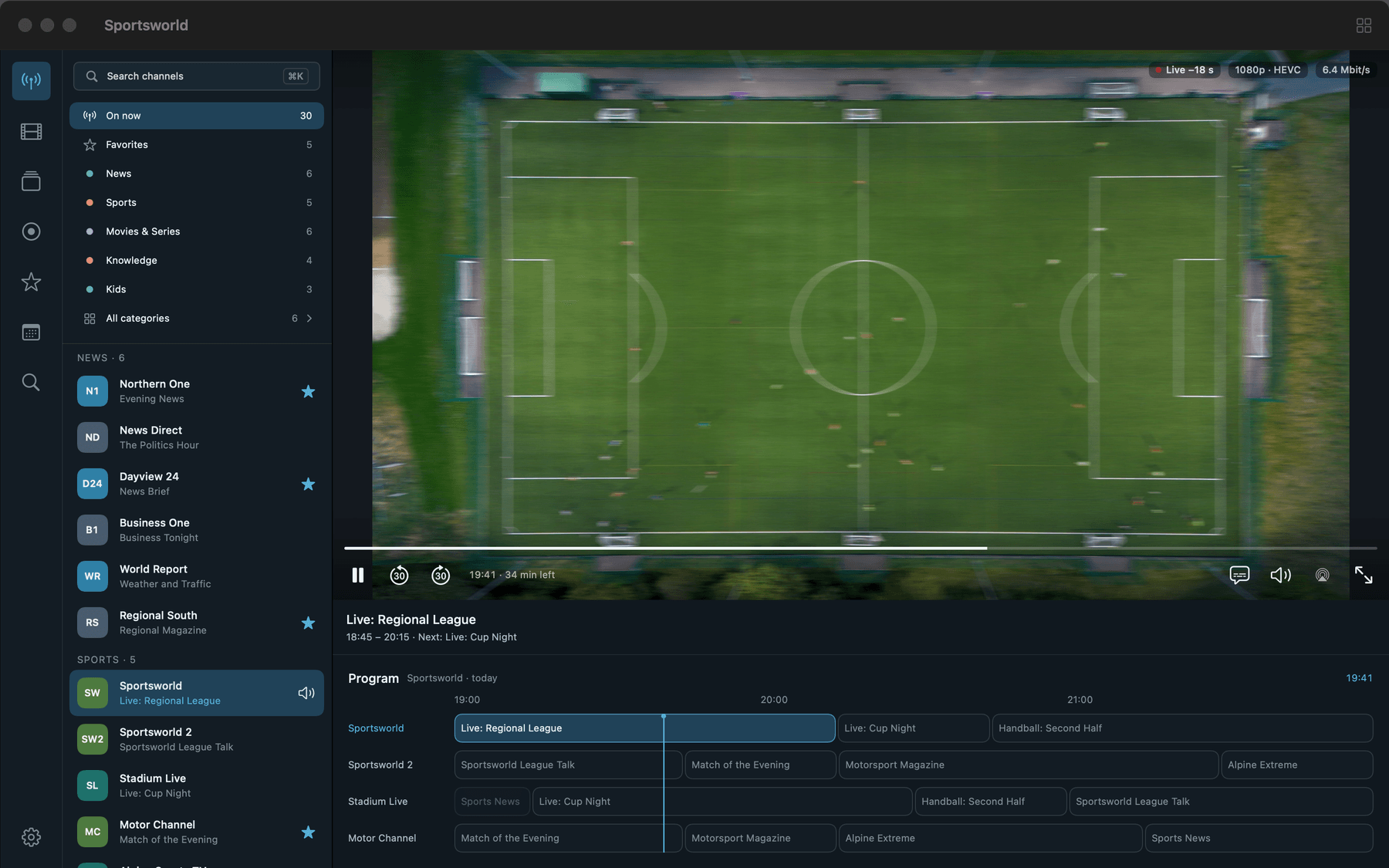
Most IPTV apps are made for the TV or the phone. On the Mac you are usually left with a browser tab or a general media player that opens one link at a time and forgets your list. Neverlag is a Mac app (macOS 14 or newer) with the same sources, the same guide and the same subscription as on Apple TV, iPhone and iPad.
It plays what you bring: an M3U playlist or the credentials of an Xtream Codes provider. Neverlag contains no channels, delivers none and brokers none.
Settings → Providers → “Add Xtream account”: server address, username, password. Or “Add M3U playlist” with a link or a file. Neverlag loads the catalogue, sorts the channels into groups and fetches the programme guide (XMLTV) if your provider offers one.
The password goes into the Mac’s keychain and nowhere else. There is no account at Neverlag.
Neverlag runs in a normal Mac window: channel list on the left, player on the right, picture in picture when you work on something else. In full screen the display switches to the programme’s frame rate (“Match refresh rate to programme”) so sport runs evenly.
Smart lists — On now, Favorites, Recently watched, plus tags and groups in the sidebar — exist on the Mac and the iPad. AirPlay sends the picture to a TV.
Pick a programme in the guide and record it — once or as a series rule, with lead-in and lead-out. The file is an MKV without loss, in a folder you choose or on a NAS via WebDAV. The Mac is the platform for reliable scheduled recordings: the app stays open, the Mac does not sleep, the recording runs.
Timeshift works on every channel: pause, 30 seconds back, back to live.
Measured: a 44-minute recording over the running playback connection, 0 connection-limit errors.
Neverlag separates fetching the stream from playing it. One part keeps a reserve of 20 to 30 seconds; when the connection breaks, a new one is fetched in the background before the reserve runs out. The picture keeps running, the rewind buffer stays, nothing starts over.
Measured: connection cut for 20 seconds — no freeze. Cut for 60 seconds — the picture stood for 40.3 seconds, and the stream did not start over. New connection 1.1 to 2.1 seconds after the server was back.
If your connection delivers slightly less than the channel needs, Neverlag plays marginally slower instead of stopping to reload. You notice nothing; the reserve fills back up.
Measured: 15 minutes on a throttled line — 0 freezes and 1 connection with the pace adjustment, 42 freezes without it.
Settings → Diagnostics says in plain words whether the provider, the line or the device was the problem — with a history per provider and channel over 30 days and a network test against a neutral host. Everything stays on the Mac; nothing is sent anywhere. For support you share the journal as a file.
Same app, same subscription, same sources. The differences come from the devices.
| Function | Mac | iPhone and iPad | Apple TV |
|---|---|---|---|
| Scheduled recordings | while the app is open | end when the app goes to the background | only to a NAS |
| Recording destination | folder of your choice or NAS | Files app or NAS | NAS (WebDAV) |
| Smart lists | yes | iPad only | no |
| Match refresh rate to programme | in full screen | no | tvOS setting “Match Frame Rate” |
| Picture in picture | yes | yes | yes |
| AirPlay | yes | yes | no |
| Pairing | sends and receives | sends | receives |
Full table in the help: Platform differences.
Neverlag is an IPTV player for Apple TV, iPhone, iPad, Mac and Fire TV for Xtream Codes and M3U providers. It separates fetching the stream from playing it, so that connection drops do not lead to reloads. Measured: 60 seconds without a connection, zero reloads.
Measured: Neverlag, in the Playback Lab, on our own devices. Other players: not yet measured. We name no providers and recommend none — you bring your own list or credentials.
macOS 14 or newer. Apple TV needs tvOS 17, iPhone and iPad iOS or iPadOS 17.
Apple TV, iPhone and iPad are in the App Store now; the Mac app follows shortly under the same link. One purchase covers all four Apple devices (Universal Purchase), Family Sharing included. Download free, try for seven days, then subscribe — the App Store shows the price for your country.
Yes, as long as the app stays open and the Mac does not sleep. A recording while the Mac is off is not possible. For a device that is always on, a NAS via WebDAV is the better recording destination — the Apple TV records there too.
Yes. The Apple TV shows a six-digit code and a QR code; the Mac transfers the provider credentials encrypted over your home network. Nothing has to be typed with the remote.
No. Neverlag is a player. You need your own M3U playlist or the credentials of an IPTV provider; the lawfulness of the source is your responsibility. Neverlag names no providers and recommends none.
Your list, your provider — try it free for 7 days, then you decide. Mac, iPhone, iPad, Apple TV. Family Sharing included. Cancel any time.
Now on the App Store for Apple TV, iPhone and iPad. The Mac app follows shortly under the same link. One purchase for all Apple devices (Universal Purchase).
Neverlag is a player. You need your own M3U playlist or credentials from an IPTV provider. Neverlag does not contain, deliver or broker any content.