
Which iOS does Neverlag need?
iOS 17 or iPadOS 17 or newer. One subscription covers iPhone, iPad, Apple TV and Mac, Family Sharing included.
IPTV on iPhone and iPad
An IPTV player for iOS and iPadOS with picture in picture, a programme guide and a reserve that keeps the picture running when the connection falters.
Apple TV · iPhone · iPad · Mac · Fire TV · Android soon
Now on the App Store for Apple TV, iPhone and iPad. The Mac app follows shortly under the same link. One purchase for all Apple devices (Universal Purchase).
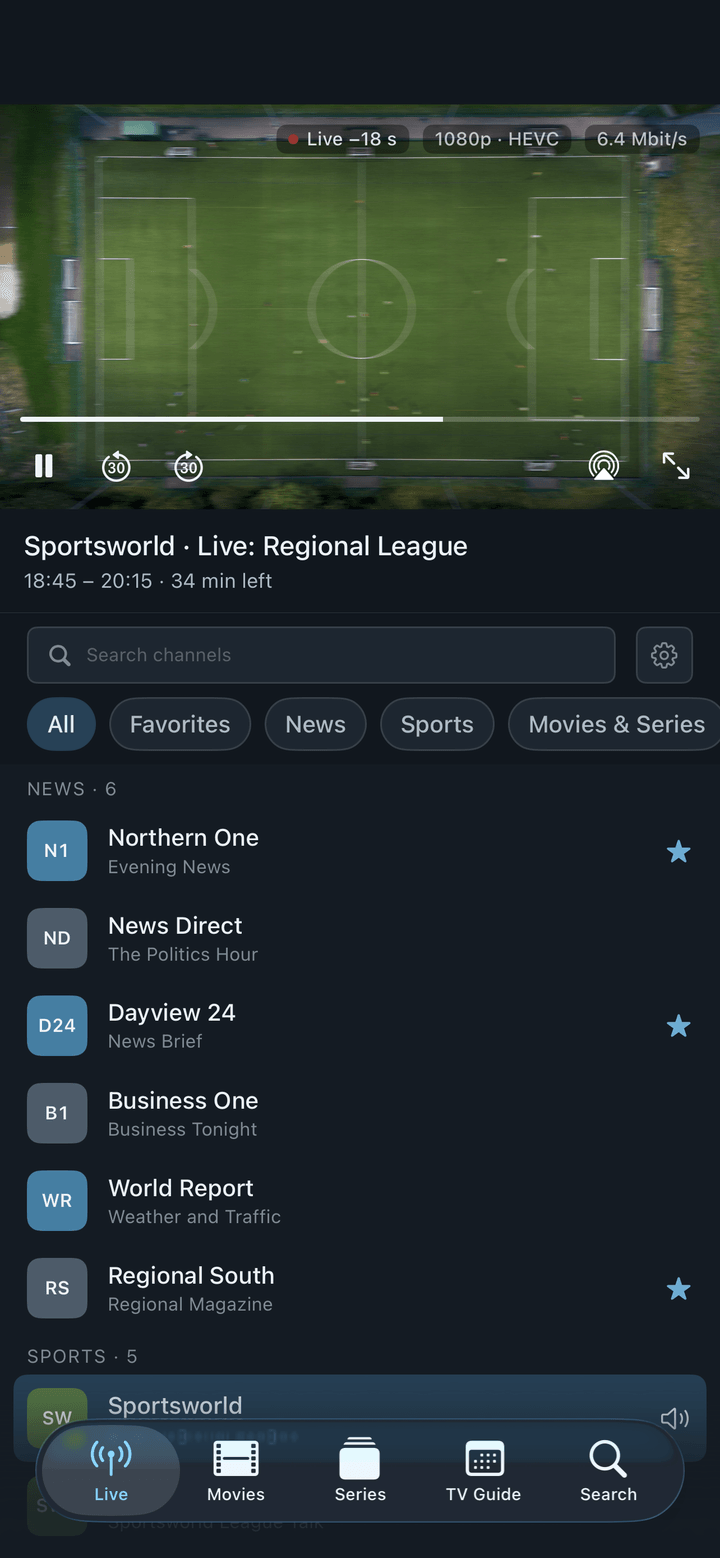
On the phone, IPTV has two enemies: a connection that changes from Wi-Fi to mobile data and back, and apps that reload the stream at every hiccup. Neverlag keeps a reserve, fetches a new connection in the background and lets you decide at which quality a channel starts when you are on mobile data.
Neverlag plays what you bring: an M3U playlist or the credentials of an Xtream Codes provider. No account, no tracking, no ads.
Settings → Providers → “Add Xtream account” or “Add M3U playlist”. Neverlag loads the catalogue, sorts channels into groups, fetches the guide. The password goes into the device keychain. Afterwards, the iPhone can send the credentials to an Apple TV with one tap — the TV shows a code, the iPhone scans it.
“Preferred startup quality” decides at which level a channel starts: highest, up to Full HD or up to HD. On the train, “Up to HD” saves data and starts faster; at home, the highest level comes back on its own. When the network changes from Wi-Fi to mobile data, Neverlag fetches a new connection in the background — the picture keeps running from the reserve.
Measured: connection cut for 20 seconds — no freeze. Cut for 60 seconds — the picture stood for 40.3 seconds, and the stream did not start over.
Shrink the player and keep watching while you read or write. The programme guide shows what is on now and next; from the guide you schedule recordings. Favourites, tags and playback positions sync between your devices over your private iCloud — nothing passes through us.
Pause live TV, go back 30 seconds, return to live — on every channel. Recordings land in the Files app on the iPhone or iPad, or on a NAS via WebDAV. They stop when the app goes to the background; for recordings while you do something else, the Mac or a NAS is the better place.
On iPhone and iPad models with ProMotion, Neverlag can show video at 120 Hz and smooth motion — two switches under Settings → Playback. Low Power Mode caps the display at 60 Hz; that is the system, not the app.
Settings → Diagnostics tells you in plain words whether it was the provider, the network or the device, with a history per provider and channel and a network test. Everything stays on the device. For support you share the journal from the app.
Neverlag is an IPTV player for Apple TV, iPhone, iPad, Mac and Fire TV for Xtream Codes and M3U providers. It separates fetching the stream from playing it, so that connection drops do not lead to reloads. Measured: 60 seconds without a connection, zero reloads.
Measured: Neverlag, in the Playback Lab, on our own devices. Other players: not yet measured. We name no providers and recommend none — you bring your own list or credentials.
iOS 17 or iPadOS 17 or newer. One subscription covers iPhone, iPad, Apple TV and Mac, Family Sharing included.
That depends on the channel’s quality, not on the player. With “Preferred startup quality” set to “Up to HD”, a channel starts in HD on mobile data instead of 4K; set it back to “Highest” at home.
No. On iPhone and iPad a recording ends when the app goes to the background — iOS stops the app. For recordings while you do something else, record on the Mac or to a NAS.
Yes, on iPhone and iPad. Also on the Mac and the Apple TV.
No. You need your own M3U playlist or the credentials of an IPTV provider; the lawfulness of the source is your responsibility. Neverlag names no providers and recommends none.
Your list, your provider — try it free for 7 days, then you decide. Mac, iPhone, iPad, Apple TV. Family Sharing included. Cancel any time.
Now on the App Store for Apple TV, iPhone and iPad. The Mac app follows shortly under the same link. One purchase for all Apple devices (Universal Purchase).
Neverlag is a player. You need your own M3U playlist or credentials from an IPTV provider. Neverlag does not contain, deliver or broker any content.