Profiles & parental controls

IPTV with profiles and parental controls

One profile per person: own favourites, own history, own channel world. A child profile sees only the channels, movies and series you allowed; a PIN protects the rest.

from version 1.0.2 – App Store update coming shortly

Apple TV · iPhone · iPad · Mac · Fire TV · Android soon

Now on the App Store for Apple TV, iPhone and iPad. The Mac app follows shortly under the same link. One purchase for all Apple devices (Universal Purchase).

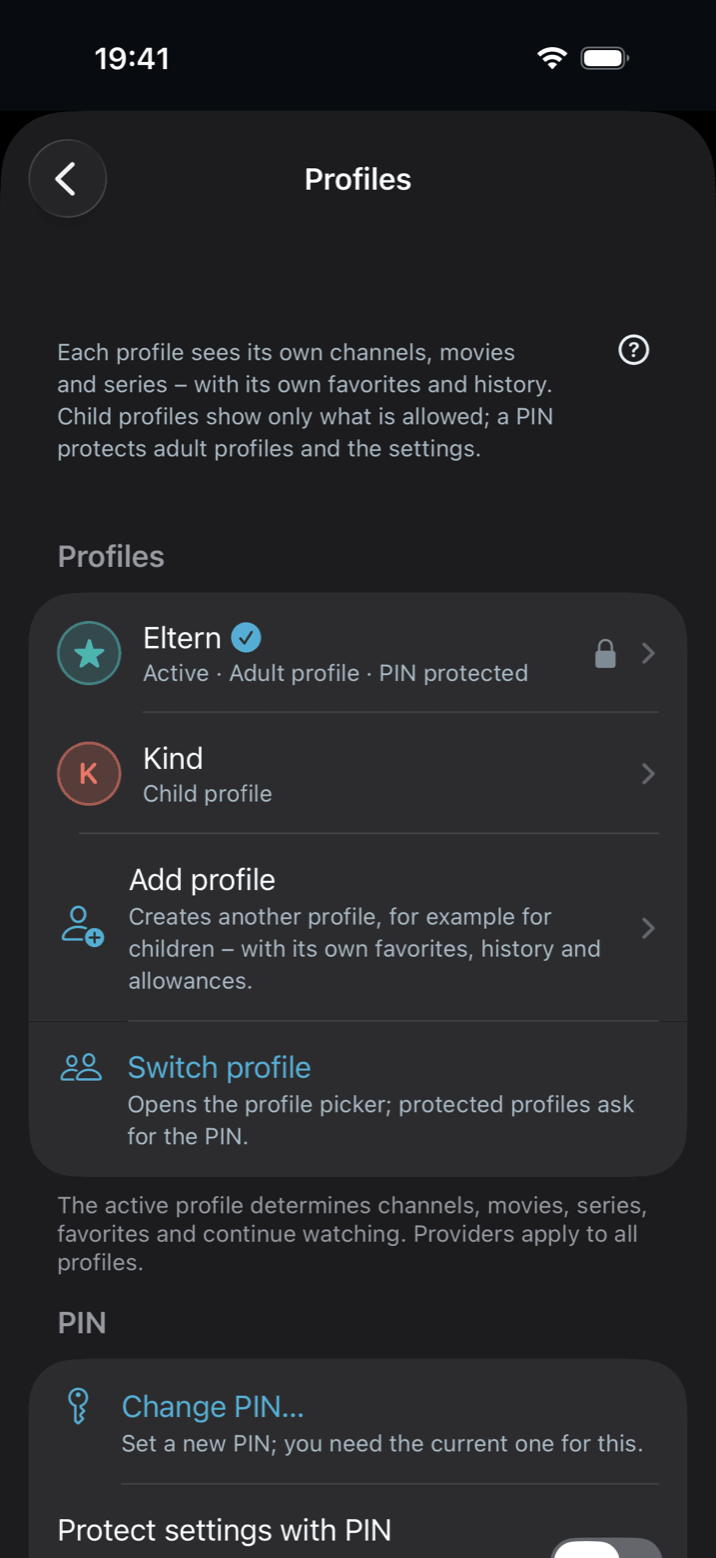
Settings → Profiles in Neverlag on the iPhone: an adult profile protected by PIN, a child profile, “Add profile” and “Switch profile”

An IPTV list from a provider usually has thousands of channels – sports, news, films, and plenty that children should not see. Profiles in Neverlag solve two things at once: everyone in the household gets their own favourites and history, and a child profile only sees what you have explicitly allowed. Your providers you set up once; each profile picks its own groups, categories and channels from them.

Neverlag is a player. It contains no channels and names no providers; what a profile may see, you decide.

How profiles and parental controls work in Neverlag

  1. 01

    Your first profile

    On first launch – also after updating from a version without profiles – you create your first profile yourself: name, colour, symbol, optionally a PIN and the “Child profile” switch. Everything already there – favourites, history, continue watching – belongs to this profile afterwards. Nothing is lost. If the earlier parental control was on, Neverlag suggests a child profile with exactly the channels your block list left.

  2. 02

    A child profile sees only what you allow

    Settings → Profiles → “Add profile”, switch on “Child profile”. A new child profile sees nothing until you choose its content: per provider, the groups for live channels, the categories for movies and series, plus single channels to hide even inside an allowed group. Quicker on the go: long-press a channel (iPhone, iPad), right-click (Mac) or hold the touch surface (Apple TV) → “Hide in this profile”.

    What a profile has not been given is missing everywhere: in the channel list, in categories, favourites and history, in search, in the guide, in movies and series and in the archive. Typing a channel number for a blocked channel asks for the PIN. If the provider adds a new group, it stays hidden in a child profile until you allow it – in an adult profile it appears by itself.

  3. 03

    PIN: for profiles, for switching, for settings

    Settings → Profiles → “Set PIN” (at least four digits). Then you can protect a profile (“Protect with PIN”: switching into it asks for the PIN) and the settings (“Protect settings with PIN”: a child cannot reach providers, content choices or profiles). The content of a child profile and of a PIN-protected profile can only be changed with the PIN – a child cannot unlock anything.

    On Apple TV you enter the PIN with the remote on a number pad; on iPhone, iPad and Mac in a text field. Forgotten? “Forgot PIN?” deletes the PIN and turns protection off; profiles and content choices remain.

  4. 04

    “Who’s watching?” – switching profiles

    With more than one profile, Neverlag asks “Who’s watching?” on launch and starts only after the choice – no channel plays before the right profile is active. On the go, the active profile sits as a coloured tile in the bar (Mac: sidebar; iPhone/iPad: above the channel list; Apple TV: header). Protected profiles ask for the PIN; a child profile is reachable without one.

  5. 05

    On the device, with you on the next one

    Profiles live on the device and do not sync via iCloud. To a second device they travel with the backup (Settings → Providers → export/import), including every profile’s content choices, favourites and playback positions. When you pair an Apple TV from the iPhone or Mac, the Apple TV takes the world of your active profile with it. Recordings belong to the device, not to a profile.

Adult profile or child profile?

Both pick their content from the providers you set up once. The difference is what happens with things you did not choose.

Adult profileChild profile
Sees by default everything except what you deselectednothing until you allow it
New group from the provider appears by itselfstays hidden until allowed
Switching into it free, or with PIN if protectedwithout PIN
Changing its content with PIN if protectedonly with the PIN
Own favourites, history, resume yesyes

Neverlag is an IPTV player for Apple TV, iPhone, iPad, Mac and Fire TV for Xtream Codes and M3U providers. It separates fetching the stream from playing it, so that connection drops do not lead to reloads. Measured: 60 seconds without a connection, zero reloads.

Measured: Neverlag, in the Playback Lab, on our own devices. Other players: not yet measured. We name no providers and recommend none — you bring your own list or credentials.

Questions about profiles and parental controls

Which IPTV app for Apple TV has a child profile?

Neverlag, from version 1.0.2: a child profile sees only the groups, categories and channels you allowed, everywhere in the app – channel list, guide, search, movies, series, archive. A PIN protects adult profiles and the settings. On Apple TV, Mac, iPhone and iPad.

How many profiles can I create?

One per person in the household – for example parents and each child. Every profile has its own favourites, history and “Continue watching”. Providers and credentials apply to all profiles; you set them up once.

What if I forget the PIN?

Settings → Profiles → Change PIN → “Forgot PIN?” deletes the PIN and turns PIN protection off; profiles and content choices stay. Then set a new PIN and switch protection back on. There is one PIN per device, not one per profile.

Do profiles sync between my devices?

No. Profiles stay on the device. They reach a second device through the backup (Settings → Providers → export/import). Favourites and history of the main profile sync via your private iCloud as before; those of further profiles do not.

Does Neverlag decide what is suitable for children?

No. Neverlag knows nothing about the content of your list; you choose per group, category and channel what a child profile may see. Age ratings from a provider are not evaluated.


Stop watching the spinner.

Your list. Your provider. Try Neverlag free for 7 days – then decide. Family Sharing included.

Neverlag is a player. You need your own M3U playlist or credentials from an IPTV provider. Neverlag does not contain, deliver or broker any content.