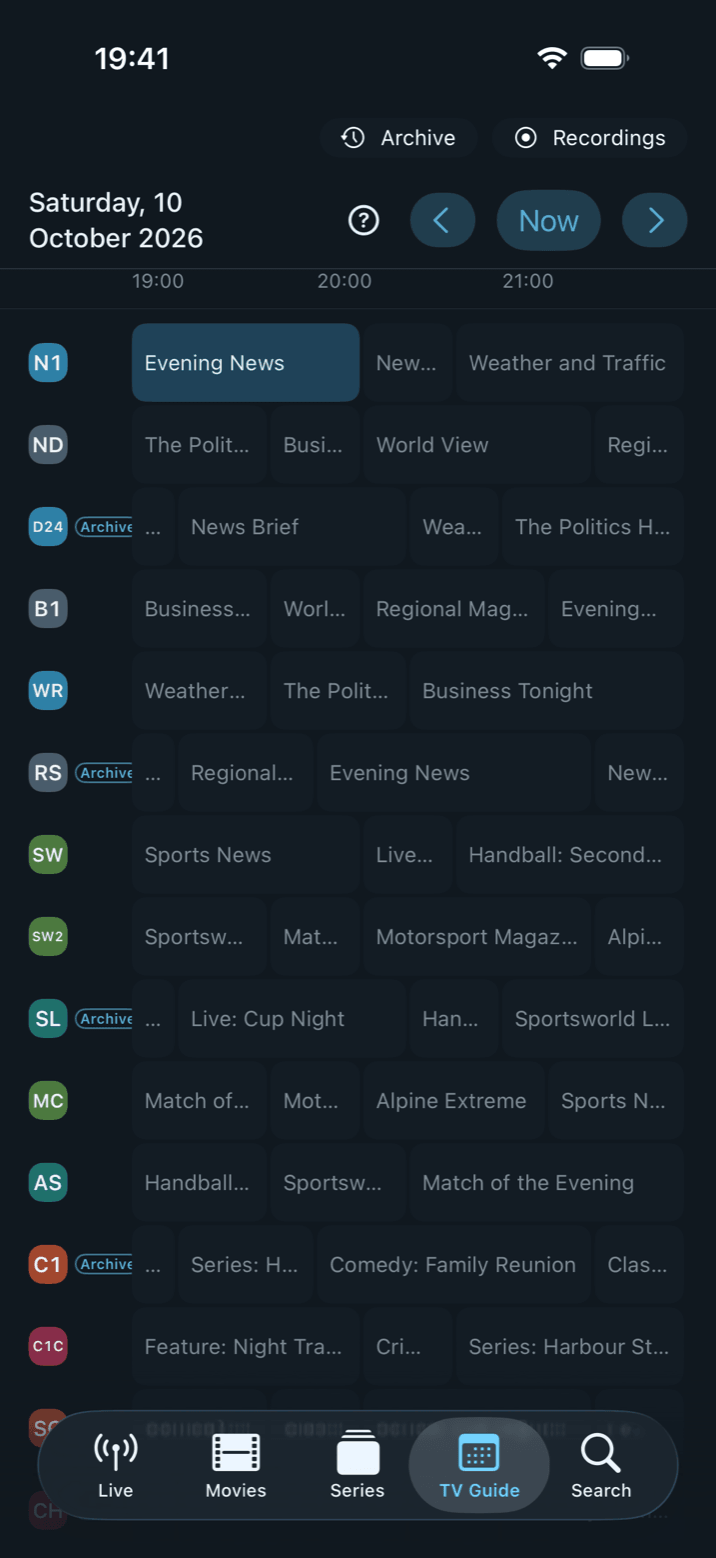
Catch-up – some call it archive, replay or timeshift TV – means your provider stores the programme of certain channels for a few days and hands it out on request. Neverlag reads from your list which channels have an archive and how far back it reaches, marks them “Archive”, and starts a past programme straight from the guide, from search or from its own Archive area. Nothing to configure.
Neverlag is a player. The archive, like the channels, comes from your provider; Neverlag delivers no content and names no providers.
- 01
Archive channels are marked
Channels with an archive carry a small “Archive” mark in the channel list and in the left column of the guide. The detail sheet of a programme also says how far back the archive reaches (“Archive · 2 days”). Whether a channel has an archive comes from your provider’s list (Xtream: tv_archive; M3U: catchup, catchup-days) – you set nothing.
- 02
The Archive area: by programme or by channel
The archive has its own area next to Live, Movies and Series – on Mac and iPad in the sidebar, on iPhone as the “Archive” chip above the guide, on Apple TV as the “Archive” pill in the header. It follows the group you chose for the live list: “All”, “Favourites” or a group.
“By programme” works like a library: one tile per programme, not per broadcast – with the picture from the guide, the number of episodes and when the latest one aired. Open a tile and you get the episode list, with season and episode if the guide names them. “By channel” shows the archive channels on the left; on the right you pick the day (today, yesterday, the weekdays) and tap a programme.
Programmes you started are listed under “Continue watching” at the top; a thin bar shows how far you got.
- 03
Straight from the guide or from search
Open the guide, page back with “−3 h”, tap a past programme on an archive channel and choose “Play programme”. The programme starts from the beginning in the movie player: progress bar, seeking, pause. Stop halfway and Neverlag remembers the spot – per profile – and asks next time whether to continue or start over. Search starts a found past programme the same way.
- 04
Honest about what the provider delivers
Some providers announce an archive but quietly serve the live programme when asked for a past one. Before starting, Neverlag sends a short request to check whether a real archive stream comes back for the chosen time. If not, nothing starts and you see “Archive not available” with the reason – instead of a wrong programme.
Measured in October 2026 with two providers: both announced an archive and redirected every archive request to the live stream – there Neverlag shows “Archive not available”. Whether your provider really delivers shows at the first start.
- 05
Find a match in the archive
Neverlag tags every programme in the guide by itself – football, ice hockey, tennis, news, kids and more. In the Archive area the tag chips filter both views: tap “Football” and you see all matches of the archive days at a glance.
- 06
What catch-up cannot do
Neverlag plays only what the provider actually keeps; the archive window (days) comes from the provider. Seeking needs a provider that allows jumps in the archive stream – usual with Xtream panels. If the guide has no data for a day, that day is empty. An archive playback counts as one connection at your provider, like a movie.