The quality window
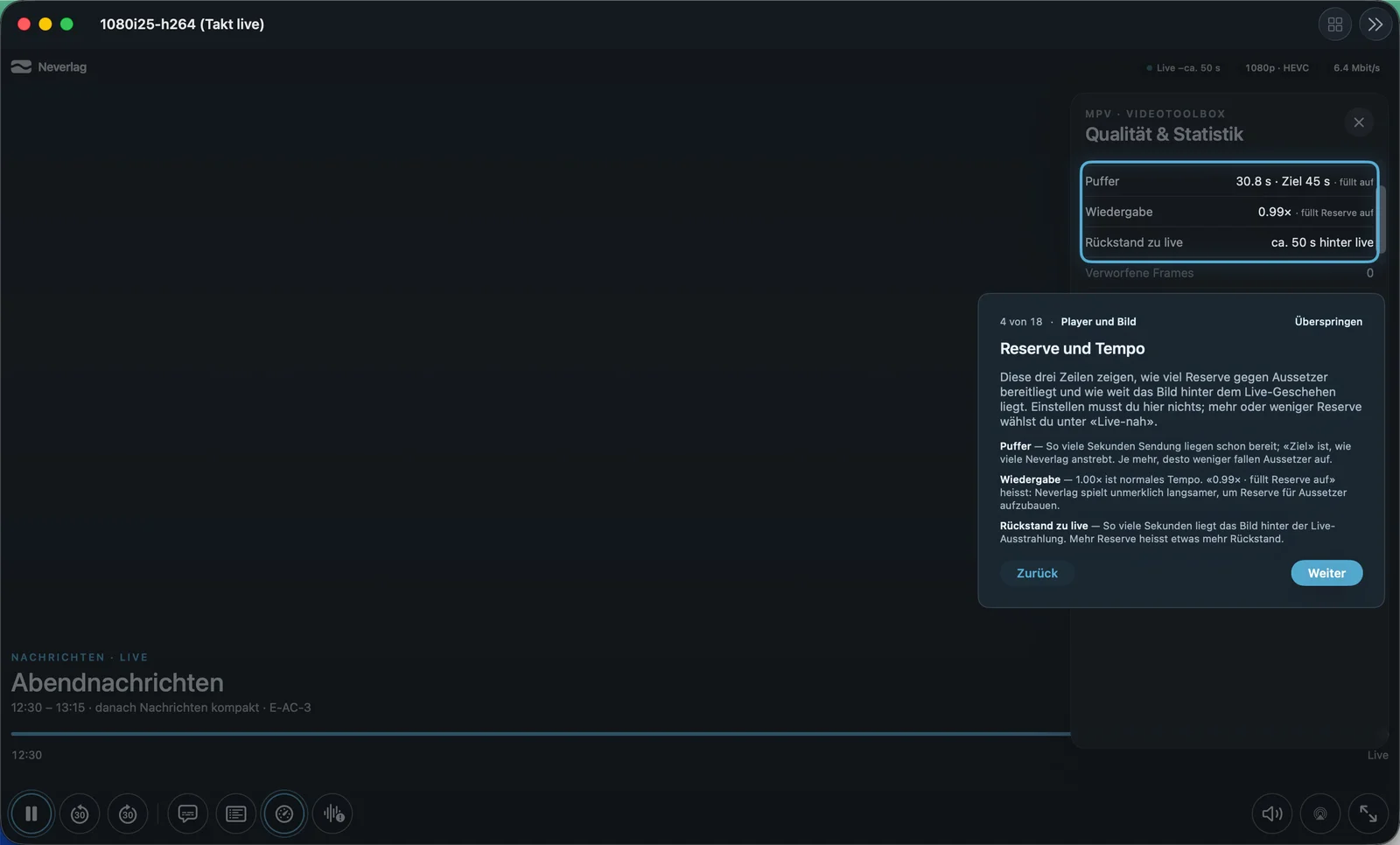
The quality window shows how well a channel is running right now. Open it in the player via the speedometer icon “Quality”. From the tour: “Look inside when something stutters or hangs.” You do not need to set anything here, unless you want to select a source permanently.
| Mac | iPhone | Apple TV |
|---|---|---|
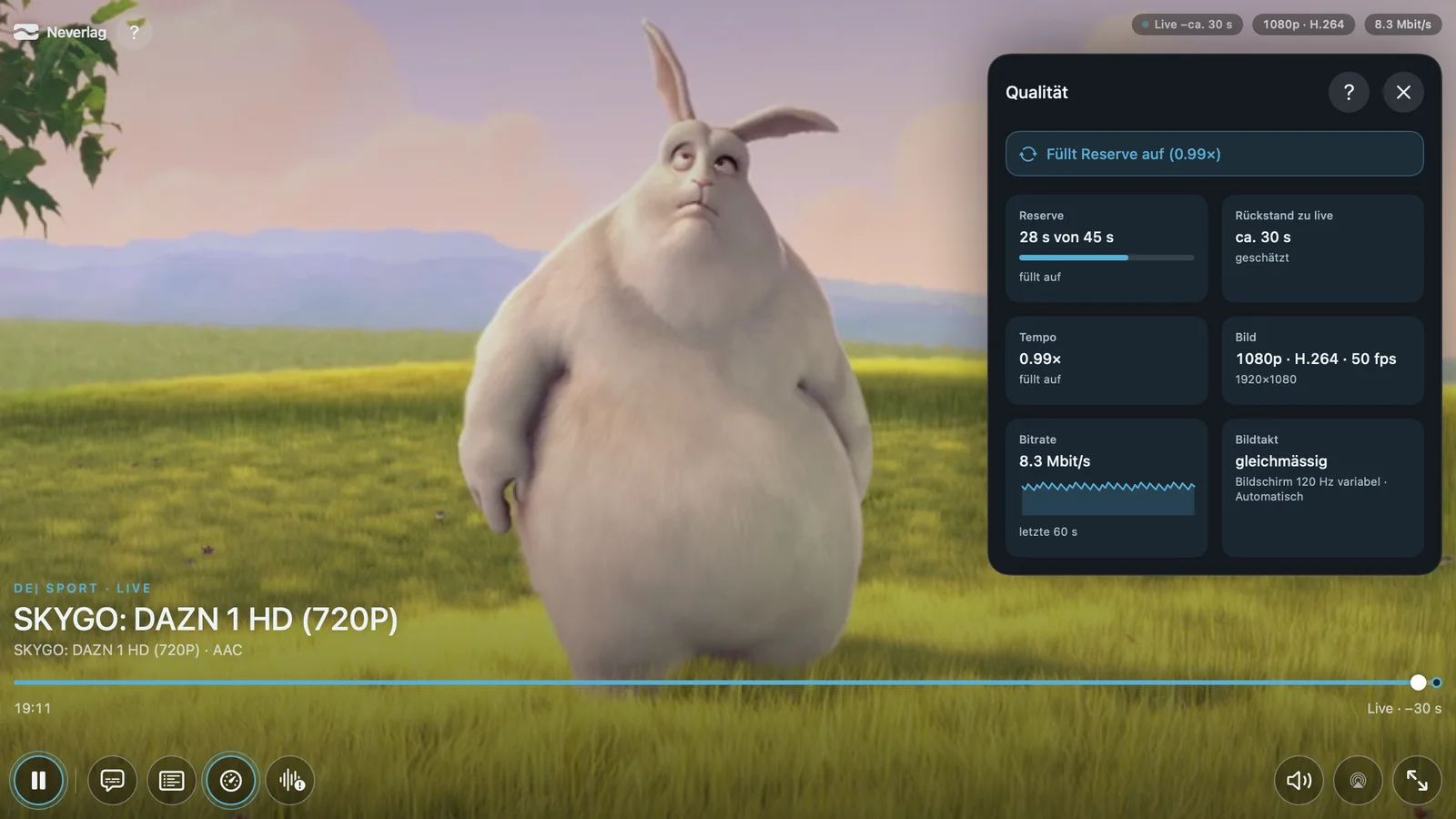 | 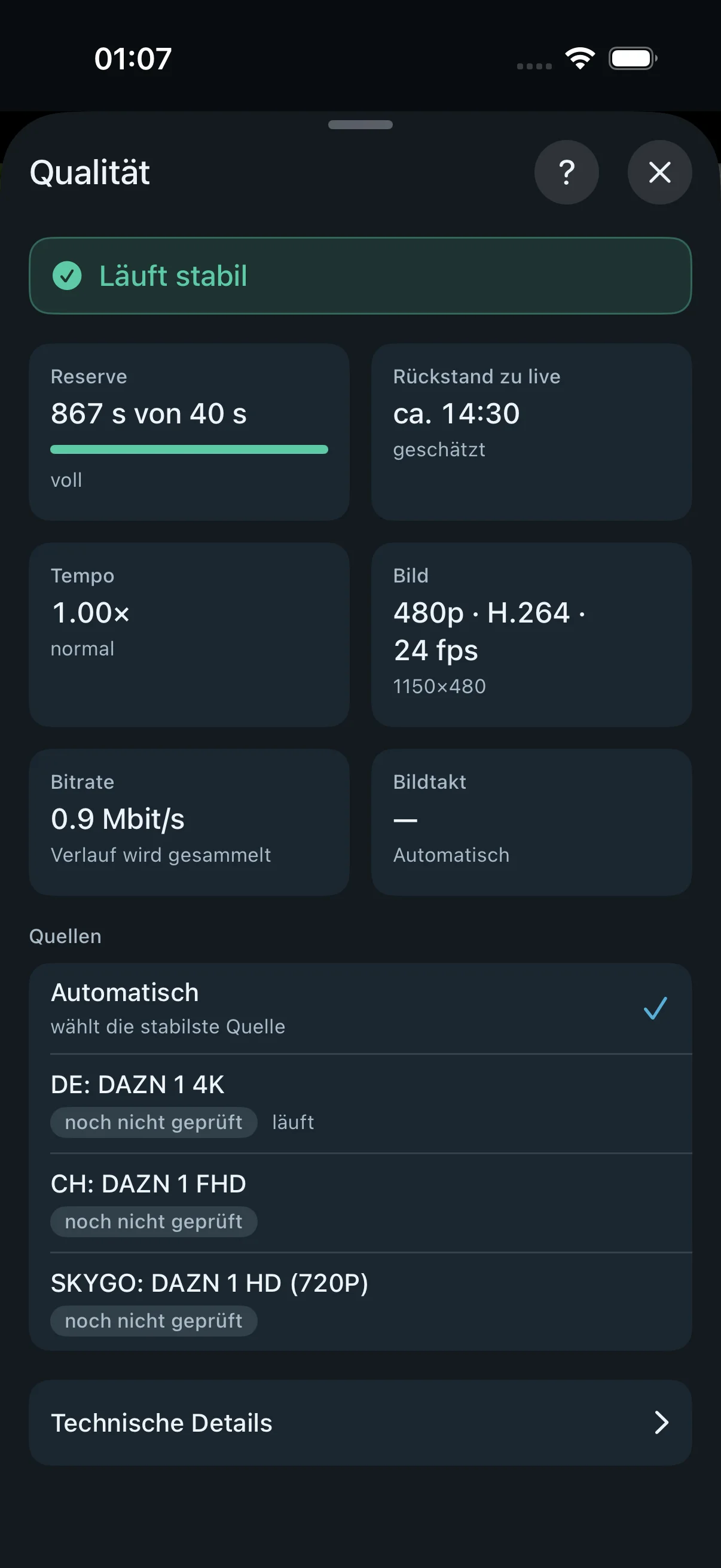 | 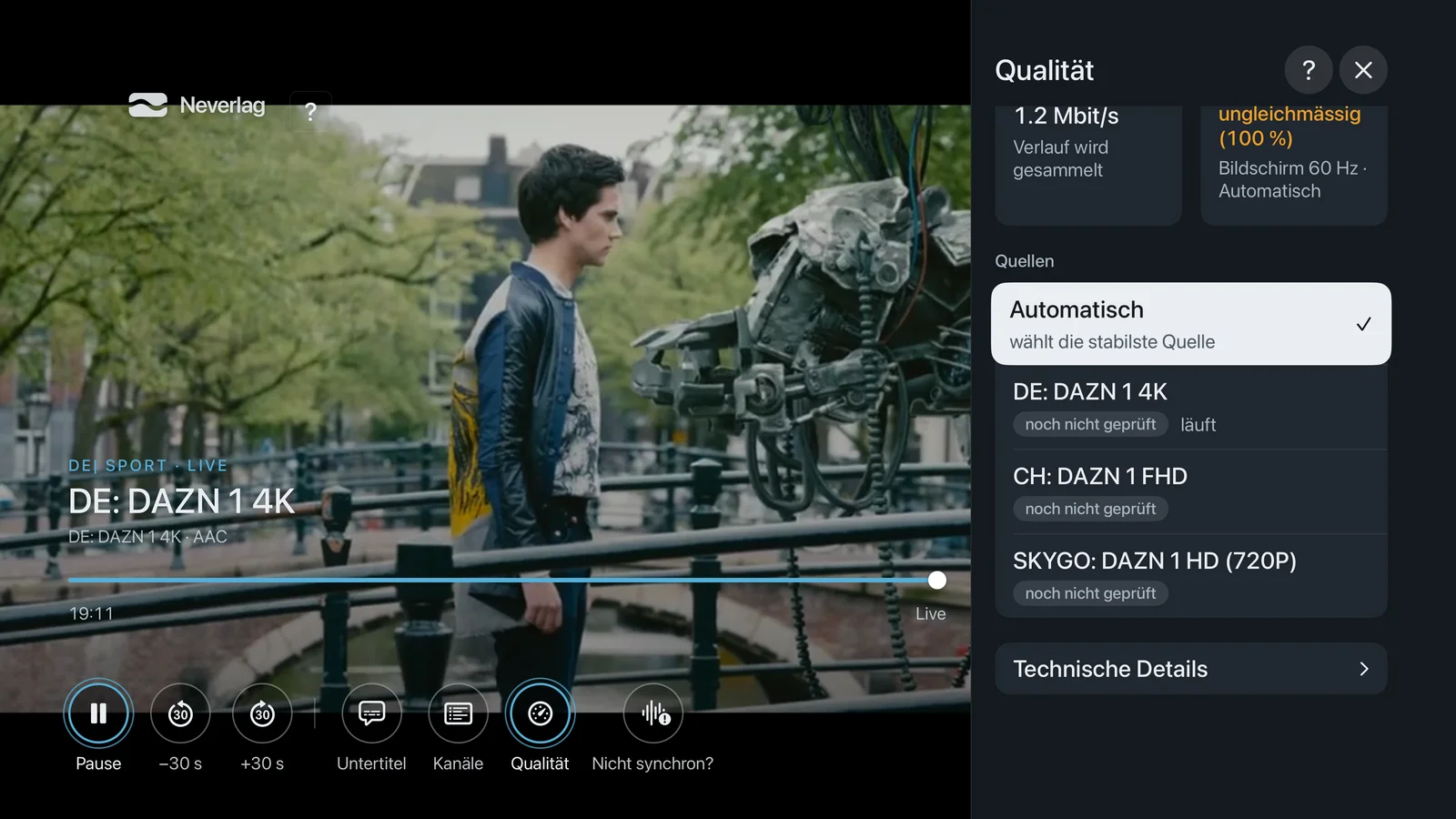 |
On the iPad it looks like on the Mac. On the Apple TV the Back button closes the window. On all devices there is a “?” at the top that shows the hints for the tiles.
The status sentence
At the very top is a coloured sentence that sums everything up:
| Sentence | Meaning |
|---|---|
| Running smoothly | All good. Reserve at target, speed normal. |
| Refilling reserve (…) | Running at 0.99× and collecting reserve. In brackets: how much is there already. Normal after start-up and after a dropout. |
| Playing – refill paused (…) | Running normally, but Neverlag is not refilling right now. The reason is in brackets (see Speed). |
| Provider stalling – reserve bridging | The provider is delivering nothing right now, the picture runs from the reserve. You do not have to do anything. |
| Picture frozen – provider not delivering | Reserve empty, provider delivering nothing. Neverlag reconnects and looks for alternatives. |
| Picture frozen – connection too slow | Reserve empty, your line or the provider deliver too little. |
| Picture frozen – device busy | The device cannot manage the decoding. |
| Starting … | Channel is loading. |
| Paused | You have pressed pause. |
| Playback interrupted | Playback has stopped; the reason is shown in the player. |
| Nothing playing | Nothing is running. |
The tiles
Reserve
“This many seconds of picture are held in reserve, with the target next to it. The fuller the bar, the less stalling there is when the provider drops out.”
Shown as “38 s of 45 s” with a bar, or “full”. If your device has less memory than the chosen target needs, it says “chosen 90 s, at most 60 s on this device”.
Normal: After start-up the reserve rises slowly to the target. With “Near live” the target is small. If the reserve falls over minutes even though “refilling reserve” is shown, the provider is delivering too slowly.
Behind live
“This is how far the picture is behind the live broadcast. Some delay is normal and protects against stalling.”
Shown as “18 s behind live”, with “measured” or “estimated”. The delay is roughly the reserve plus whatever the provider itself is lagging.
Normal: About the chosen reserve. If it grows continuously, the provider is lagging; a rebuild (“Rebuilt — rewind window restarted”) resets it.
Speed
“1.00× is normal speed. ‹0.99× · refilling reserve› means: Neverlag plays imperceptibly slower to build up reserve for dropouts.”
If it says “refill paused” here, an addition tells you why:
- A/V offset – picture and sound are currently apart; stretching would make it worse.
- stream data error – the provider has just sent broken data.
- bitstream audio – Dolby sound goes unchanged to the amplifier and cannot be stretched.
- display in step with programme – the Mac is running at 50 Hz, so it stays at 1.00×.
- cut ahead – a splice point is coming up, across which there is no stretching.
- pause between speed changes – at most one change per minute.
- provider outage, buffer unknown, measuring delivery – Neverlag is waiting for reliable values.
Normal: Alternating “0.99× · refilling” and “1.00× · normal”.
Picture
Shows resolution (“1920×1080”, “3840×2160”), codec (how the picture is packaged), whether the hardware decoder or software is working, dropped frames and the A/V offset.
- Dropped frames: “Frames that arrived too late and were skipped. A few are normal; if the number keeps rising, it stutters visibly.”
- A/V offset: “How far sound and picture are apart. Small values are not noticeable; red means lips and voice no longer match.”
- Software: The device decodes in software. See Hardware decoder.
Bitrate
“How much data arrives per second, as a curve over the last few seconds. If it collapses, the provider or the line is delivering less right now.”
After start-up it briefly says “collecting history”. Normal: a calm line; a few megabits per second for HD, considerably more for 4K. Spikes upwards are normal (the provider sends bursts), holes downwards are dropouts.
Frame cadence
“‹even› means every frame stays on the screen for the same length of time. Underneath is the refresh rate the display is currently running at.”
Lines:
- even or uneven (x %) – how often a frame stayed too short or too long. Under 1 % is good.
- Output 50 fps – how many frames per second playback outputs.
- Display 50 Hz (matched to programme), Display 120 Hz variable, Display 60 Hz (Low Power Mode), Display 60 Hz (Frame rate limited) – what the display is doing right now and why.
If it says “Low Power Mode” here, switch it off if it stutters. More under Picture and sound.
Sources
“Here you choose which source the channel plays through. ‹Automatic› takes the most stable one; a fixed choice switches the automatic mode off for this session.”
The list shows every source of the channel family with full name, label (4K, FHD, HD) and state: “playing”, “stable”, “disrupted”, “checking”, “not checked yet”. A tick marks the choice. If the channel has only one source, it says “This channel has only one source.”
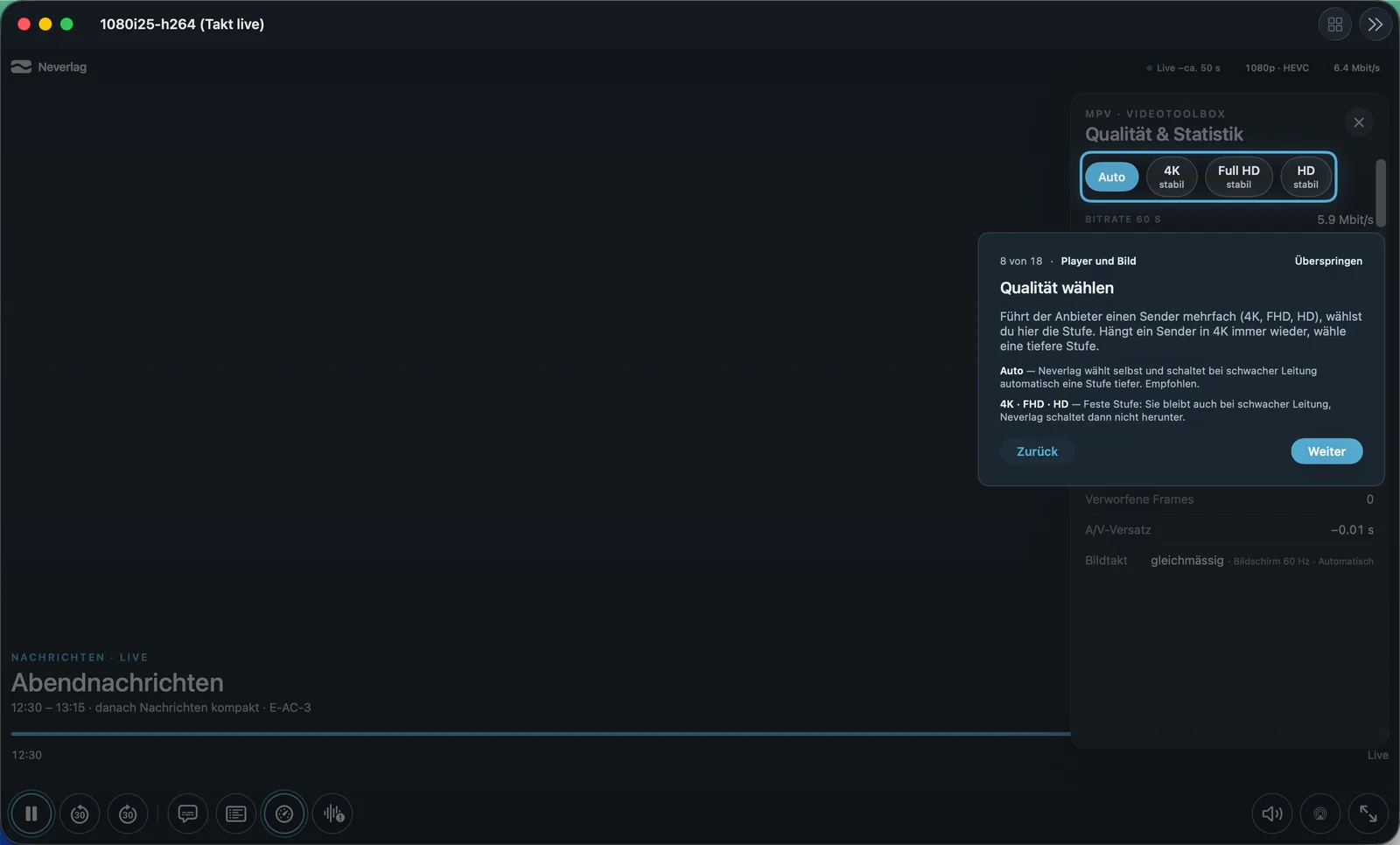
A fixed choice stays even on a weak line; Neverlag then does not switch down. “Automatic off for this session” reminds you of that.
Technical details
At the bottom, collapsed. Only relevant for you when reporting a problem:
- Engine – the playback library and its version.
- Decoder – which chip or which software decodes.
- Download (cache) – what the receiver is currently holding.
- Raw buffer – the raw value of the reserve, without rounding.
- Technical target reserve – the actual target, e.g. “60 s (chosen 90 s)”, if the device can do less.
- … × real time – how fast the provider delivers compared with real time. Below 1.0 for a longer period means: too slow.
What normal values are
| Tile | Normal | Noticeable |
|---|---|---|
| Reserve | close to target, bar full | falls over minutes |
| Behind live | roughly the reserve | grows steadily |
| Speed | 1.00× or 0.99× alternating | permanently “refill paused” without a clear reason |
| Dropped frames | single digits, stays put | keeps rising |
| A/V offset | grey, small | red |
| Bitrate | calm line | holes, drop to zero |
| Frame cadence | even, under 1 % | several per cent, “Low Power Mode” |
Further reading
- How Neverlag stays stable – what is behind the numbers
- Troubleshooting – what you can do about noticeable values
- Settings → Playback – reserve, frame pacing, startup quality