
Archive: catching up on programmes (catch-up)
From version 1.0.2 with its own section and a “By programme” library.
| By programme (iPhone) | By channel (iPhone) | By channel (Apple TV) |
|---|---|---|
 |  |  |
What it is
Some providers keep the programmes of individual channels for a few days. Neverlag calls this the archive. On those channels you can watch a programme that has already aired from the very beginning – with seeking and “Continue watching”, just like a film. The archive has its own section alongside Live, Movies and Series; you can also start a past programme straight from the TV Guide or from search.
Whether a channel has an archive, and how many days back it goes, is
reported by the provider in its list (Xtream: tv_archive and
tv_archive_duration; M3U: catchup, catchup-source,
catchup-days). Neverlag reads this in – there is nothing for you to
set up.
How to use it
Spotting archive channels
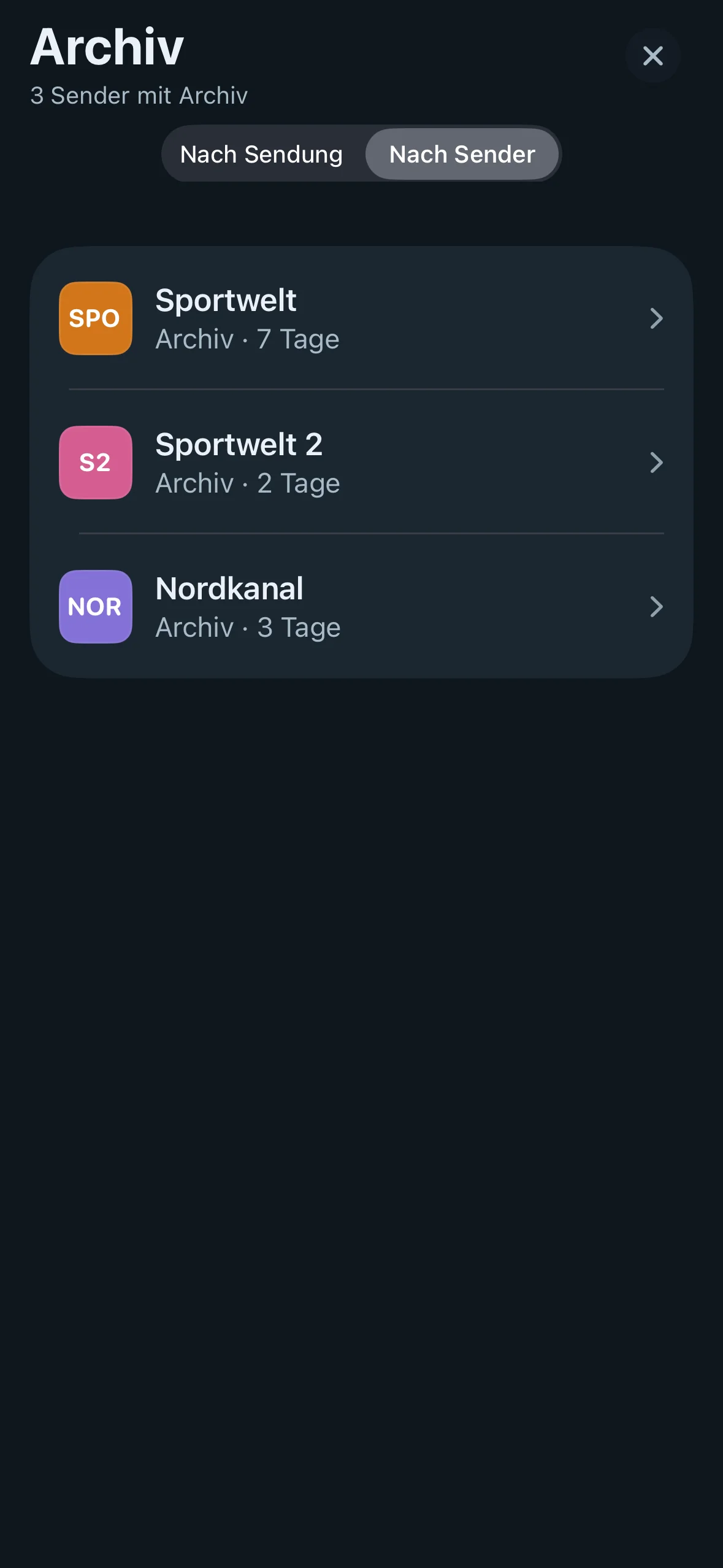
Channels with an archive show a small clock-with-arrow symbol next to their name in the channel list, in the TV Guide and in search. The “By channel” view and a programme’s detail sheet tell you how far back the archive goes (“Archive · 7 days”).
The “Archive” section
- Mac and iPad: sidebar → Library → Archive. iPhone: “TV Guide” tab, the button with the clock and arrow at the top right. Apple TV: the Archive tab in the top bar.
- The archive only shows channels that your profile is allowed to see and that have an archive. It also follows the selected group: whatever you pick for the live list in the sidebar (Mac, iPad), in the chips (iPhone) or in the group row (Apple TV) – All, Favorites or a group such as “Sky” or “General” – applies here too. Switch the group and the archive switches with it straight away.
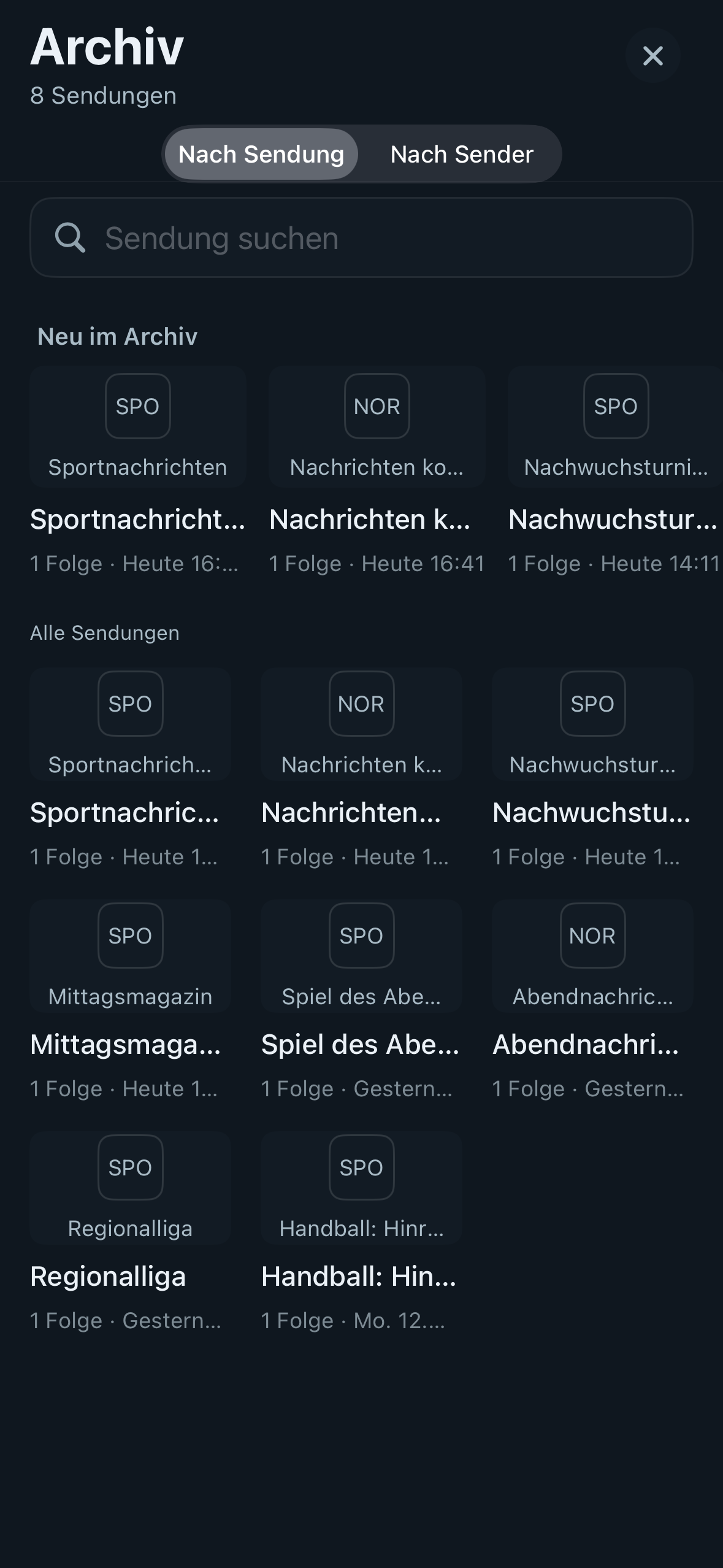
- At the top is a switch with two views: By programme (the default) and By channel. The app remembers your choice. Below the title you can see how many programmes or channels with an archive there are (“8 programmes”, “3 channels with archive”).
- Next to it is a row of tag chips (“Football”, “News”, “Kids” …) – only the tags that currently appear in the archive. A chip filters both views; see Automatic tags. Tap “✕” to clear the filter.
- If you have started watching archive programmes, Continue watching appears right at the top: every programme your profile has started, with channel, day and progress. Tap one to pick up where you left off.
“By programme” view (library)
Every programme the TV Guide knows about for your archive channels within the archive window is gathered into tiles, just like series – one tile per programme, not per broadcast.
- The tile shows the picture from the TV Guide (if the provider supplies one), otherwise the channel logo with the title; underneath are the title, the number of episodes and when the latest one aired.
- The most recent programme comes first. At the top, a New in the archive row shows everything added in the last 24 hours.
- Use the Search programmes field to find a programme by title.
- Below that comes All programmes, also as tiles.
- Open a tile → episode list: season and episode if the TV Guide gives them (e.g. “S3 E4 · Episode 4”), otherwise date and channel; episodes you have started show a progress bar. Tap one to play the episode from the archive – with seeking and “Continue watching”.
- If the same episode aired on several channels or on several days, it appears as one entry with several sources (most recent first). To make this work, Neverlag tidies up the titles: season and episode numbers in various formats (S03E04, 3x04, “Staffel 3 Folge 4”, “Folge 4”, “Episode 4”, “(1/2)”, “3. Bölüm”, “Epizoda 4”) are read from the title or description, channel suffixes (“– RTL”) and repeat markers (“(Wh.)”, “(R)”) are trimmed off, and capitalisation and special characters are evened out. Two different programmes (“Tagesschau” and “Tagesschau24”, “heute” and “heute-journal”) stay separate.
The library is built in the background and refreshed after every EPG import; you can keep using the app while it does so.
“By channel” view
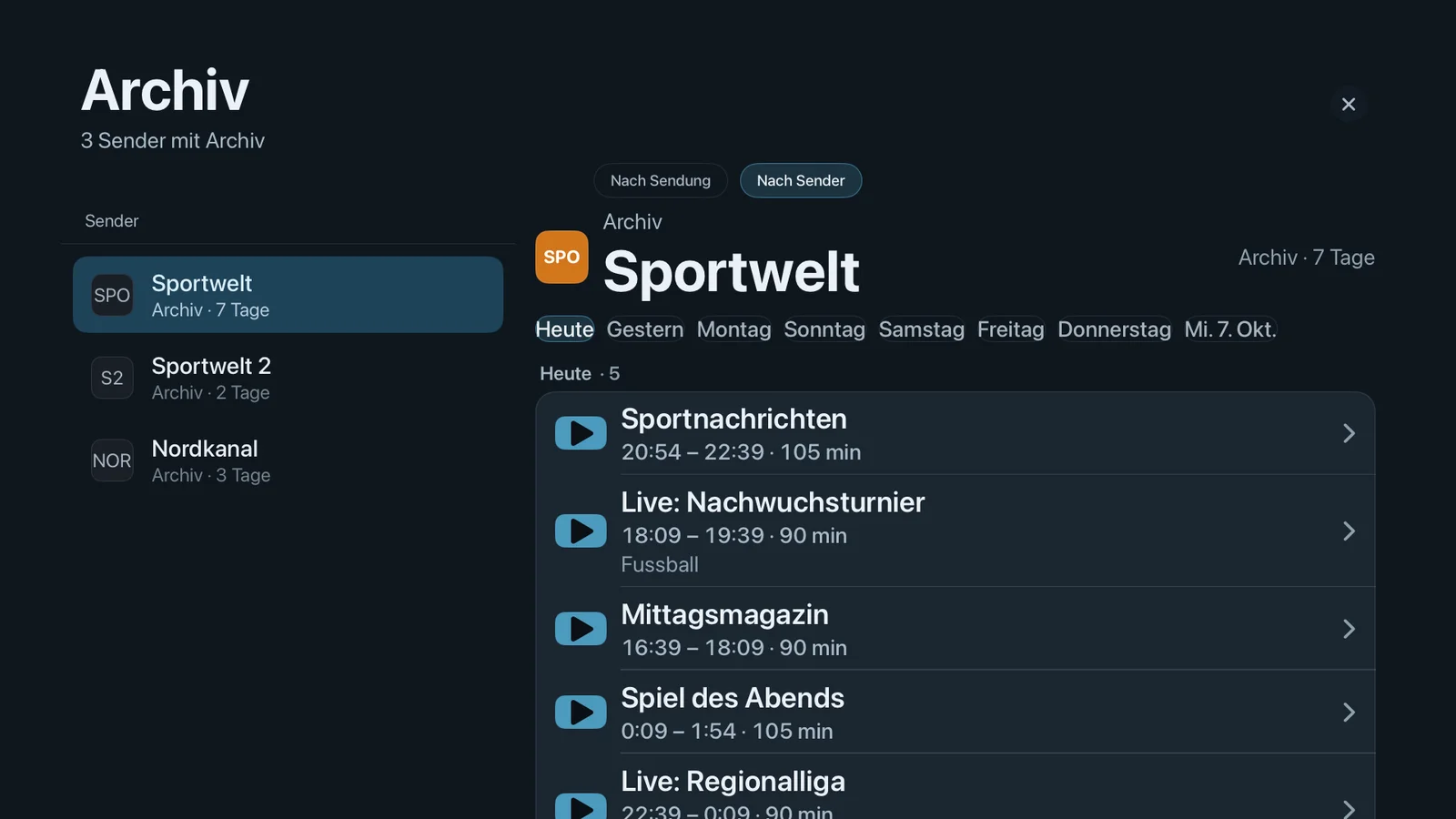
- On the left are the archive channels of the selected group – with logo, name and window (“2 days”).
- On the right you pick the day (Today, Yesterday, then the days of the week, as far back as the archive goes) and see the programmes that aired that day, most recent first, with time, length and – if there is one – the automatic tag (“Football”). For programmes you have started, a thin bar shows how far you got.
- Tap a programme to start it from the archive – with the same pre-check and message as from the TV Guide.
On the iPhone, tapping a channel opens a page of its own with days and programmes; on the Apple TV you move with the remote between the switch, tag chips, channel column, days and programmes.
Catching up on a programme from the TV Guide
- Open the TV Guide and use the arrow to the left of “Now” to page back into the past.
- Past programmes on archive channels show the clock-with-arrow symbol.
- Tap the programme → choose Play program in the detail sheet. The programme starts from the beginning in the film player: progress bar, seeking, pause.
- If you stop part-way through, Neverlag remembers the position – per profile. The next time you start the same programme, the app asks whether you want to carry on or start from the beginning (from one minute of progress, up to 95 %).
Search also starts a past programme it finds straight from the archive, if the channel has one.
On Apple TV everything works with the remote: select the programme, “Play program”, seek using the touch surface.
If the provider doesn’t deliver a real archive
Before starting, Neverlag sends a short request to check whether the
provider really delivers an archive stream for the chosen time. Some
panels report an archive but, when asked for it, quietly hand over the
live programme instead, or reply with an empty page or an error.
Neverlag then also tries the second address format that Xtream panels
understand, and remembers for each provider which format works. If that
doesn’t help either, nothing starts and you see “The provider doesn’t
deliver an archive for this programme” together with the reason (for
example “HTTP 404”, “no video, only an error page”). The journal
(Settings → Advanced → Share journal) records this as a
catchup-unavailable line with the address format and the type of
response; a successful start is recorded as catchup-start.
If a channel’s archive fails at the provider three times in a row, the channel is marked “Archive not delivered by provider” in the Archive section and moves to the end of the list; in the “By programme” library its episodes are listed after those from other channels. It stays selectable – once the provider delivers again, the note disappears with the next successful start.
Limits
- Neverlag can only play what the provider actually keeps. The archive symbol shows what the provider reports; whether it actually delivers only becomes clear when you start. With the providers measured in October 2026, it did happen that an archive was reported but not delivered – in that case you see the message “The provider doesn’t deliver an archive for this programme”.
- The archive window (in days) comes from the provider. Older programmes are not marked as playable in the TV Guide.
- Seeking requires the provider to allow jumps within the archive stream (usual with Xtream panels). If it doesn’t, the programme plays from the beginning and seeking has no effect.
- Archive programmes you have started appear under “Continue watching” in the Archive section, not in the “Continue watching” row for movies and series. After an archive programme, the next time you open the app the last live channel starts as usual.
- The Archive section shows what the TV Guide knows about the channel. If the EPG is missing for a day, that day is empty – you can’t select the programme, even if the provider still has it.
- There is no automatic gap filling after a live outage (fetching the missing section from the archive): that would need the archive to be available within the 45 s reserve, which none of the measured providers offers.
- Archive playback uses one connection at the provider, just like a film. If live TV is playing on another device at the same time, the provider’s connection limit applies.
Further reading
- Automatic tags – filter chips in the archive
- Profiles and admin – the archive only shows what the profile is allowed to see
- Player messages – “The provider doesn’t deliver an archive for this programme”
- Movies and series – the same film player
- Troubleshooting